How to test an Arabic checkout before your Saudi store launches

Arabic checkout quality includes the complete purchase, not only translated labels. Test the actual values, direction, error recovery and payment handoff with a field-level matrix and a clear acceptance record.
In this guide
Approve an Arabic transaction, not just a mirrored page
An Arabic checkout is ready when a customer can understand the order, enter valid information, correct mistakes, choose the supported delivery and payment options and reach an accurate result. Moving labels to the right is only one part of that work. The test must cover mixed Arabic and Latin text, numbers, validation, language changes and the handoff to any external payment page.
Define the acceptance journey before requesting screenshots. For example: select a variant, change quantity, enter a test delivery address, trigger a recoverable error and complete the permitted payment test. Record both what the customer sees and what the store receives. A polished checkout screenshot cannot establish that the chosen product, amount or delivery method survives submission.
Separate language, text direction and data values
W3C guidance treats language and direction as separate declarations: an Arabic document needs the appropriate language tag and RTL base direction. Logical layout properties help components adapt between languages. Unknown user-entered text can need automatic direction handling; translating the label alone does not determine the value's direction.
Mixed strings need their own check. W3C's inline guidance recommends isolating opposite-direction text, or using automatic direction for inserted content whose direction is unknown. A developer can use the suitable dir attribute or bdi element for the actual context. Test the displayed result instead of assuming that reversing every field or icon fixes it.
References: W3C: structural markup and right-to-left text · W3C: inline markup and bidirectional text
Use a field-level matrix with deliberately mixed test data
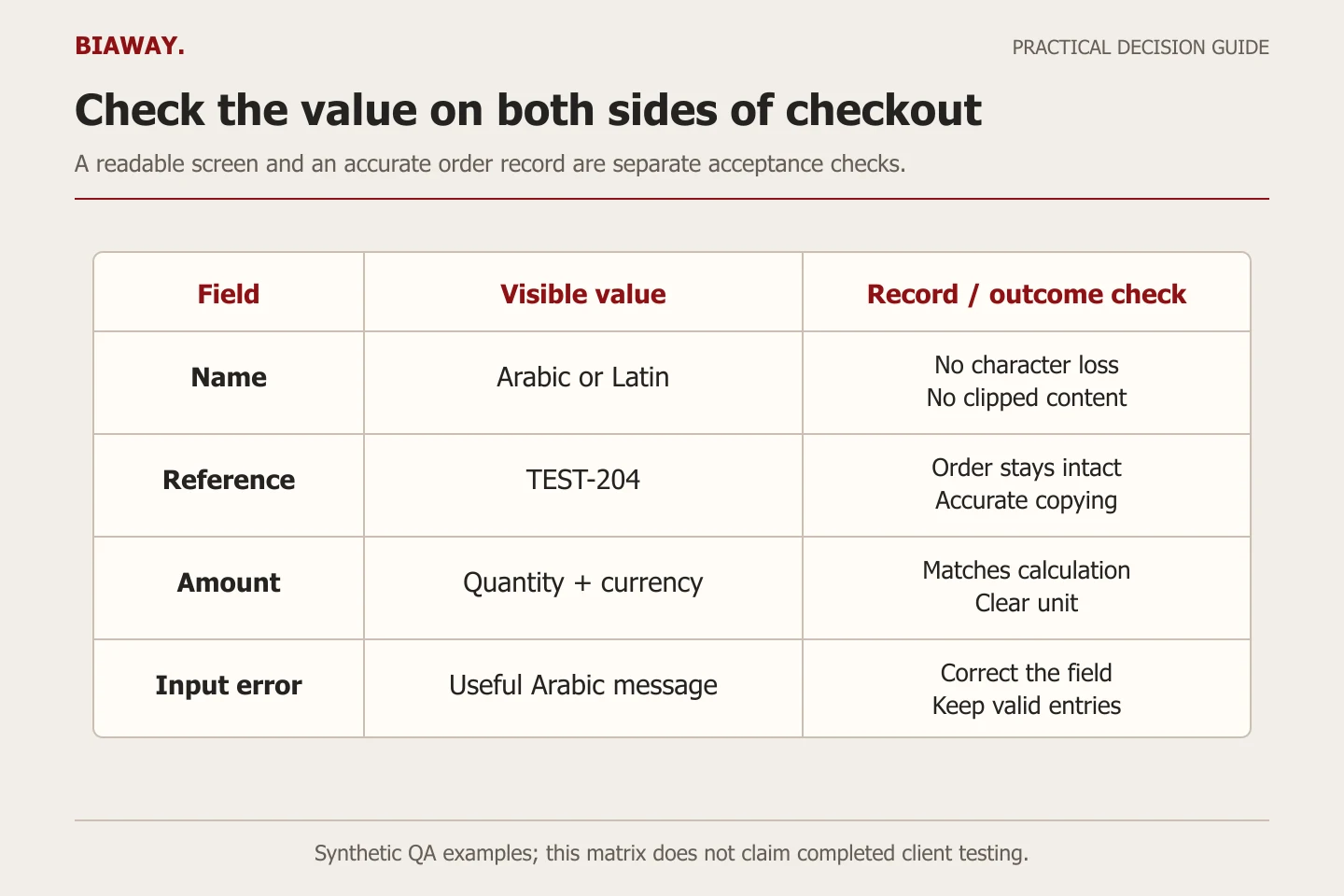
Create synthetic values that reveal a problem without exposing a customer. The following matrix is an original acceptance tool, not a list of mandatory Saudi checkout fields. Use the fields your platform and fulfilment process actually need. Do not invent a working identity, address or payment credential to make the test look realistic; use the provider's permitted test data when a structured value is required.
Scroll the table sideways to read every column.
| Field or component | Test variation | Pass condition |
|---|---|---|
| Customer name | An Arabic name, a Latin name and an allowed mixed-script name | Readable value; no clipped text or unexpected character loss |
| Address text | Arabic wording with a Latin building label and test numerals | The visible value and submitted record retain the intended parts |
| Email and order reference | A synthetic email and a reference such as TEST-204 | Characters and punctuation remain in the correct order and can be copied accurately |
| Telephone field | The provider-approved Saudi test format | The country prefix and number are understandable; rejected input has a useful explanation |
| Price and quantity | Two test quantities and the store's actual currency format | Units, totals and separators are unambiguous and match the order calculation |
| Delivery choices | An eligible destination and an intentionally unsupported case | The selected option is clear and an unavailable route is not silently accepted |
| Validation message | A missing required value followed by correction | Arabic feedback identifies the field and the correction preserves valid input |
Check errors and keyboard order after the layout changes
An automatically detected input error needs a textual explanation identifying the affected item under WCAG's Error Identification criterion. A red border by itself is not an adequate substitute. For the Arabic test, verify that the message is understandable, belongs to the correct field and remains visible long enough to act on it.
WCAG's Focus Order guidance requires a sequence that preserves meaning and operation; it does not demand one universal left-to-right order. Walk through the actual RTL form with the keyboard and confirm that the route remains understandable. Inspect any dialog opened for address selection or sign-in, then check where focus returns when it closes.
As an original recovery case, leave a required delivery field empty while completing the other allowed fields. Trigger validation, correct the missing item and continue. If all other input disappears, the next brief should include preservation of valid data. If a message covers the payment button on a small screen, record the exact viewport and component rather than asking for a vague 'Arabic layout fix'.
References: W3C WAI: understanding error identification · W3C WAI: understanding focus order
Follow the language change through the payment boundary
Test a switch from Arabic to English after selecting a product option and delivery method. Check whether the basket, quantity and intended destination remain intact. Then return to Arabic and verify that the order summary describes the same purchase. This is an acceptance test to agree with the implementer, not a promise that every platform preserves every field during every language change.
Use an authorised payment sandbox or provider-supported test mode to inspect both successful and unsuccessful returns. A gateway may control its own hosted screens, supported languages and error messages. Record that boundary explicitly: storefront, checkout, provider page, return page and customer notification. Do not approve the whole purchase journey because only the store-controlled portion was translated.
Also agree which numeral formats each input accepts. A Saudi shopper may type with a different keyboard from the tester. Where the application normalises input, verify that the saved value still means the same thing; where it cannot accept a format, explain the requirement clearly. Do not manually reverse account numbers, order references or prices to create an RTL appearance. These are data-integrity checks as well as visual checks.
Use Saudi destinations to test actual operating rules
Build an approved destination set for Saudi Arabia from the store's real coverage. A hypothetical operator might need separate cases for Hofuf and Mubarraz within Al Ahsa, another for Dammam or Khobar, and longer-distance cases for Riyadh and Jeddah. The useful question is whether the Arabic labels, address values and chosen delivery option produce the correct permitted outcome, not whether every city name appears on a translated page.
If the operator does not serve one of those destinations, test the refusal message instead of inventing coverage or a delivery price. Keep location-specific test data private and synthetic. Biaway provides its website work online; the store owner and fulfilment provider must supply the accepted address requirements, coverage and service conditions. This checklist does not imply Biaway branches or delivery operations in those cities.
Close the release with evidence and a named owner
Keep a small acceptance record: test ID, language, device and viewport, account state, input type, expected result, actual result, issue severity and retest date. Capture a screenshot for a visual defect and a short reproduction sequence for a state or payment-return defect. Redact private data from evidence. Repeat the failed case after repair and one adjacent journey that the change could affect.
Treat an incorrect amount, lost product option, blocked supported purchase or unreadable critical error as a launch blocker. Distinguish these from a cosmetic spacing issue with no loss of meaning. Test the complete English counterpart too, because a shared component repair can affect both languages. This checklist supports acceptance; it is not a claim of complete WCAG certification or payment-security approval.
When briefing Biaway, confirm the languages, platform, payment integration and depth of checkout testing in the written scope. The published e-commerce package covers a standard store implementation; custom checkout behaviour or third-party app work needs explicit agreement. Assign who can change each component and who contacts the payment provider when an issue sits outside the website team's control.
References: Biaway: website and e-commerce package scope
How this guide was prepared
Prepared with AI assistance, with platform and accessibility claims checked against the primary sources below at publication. The planning frameworks are Biaway’s editorial recommendations. Examples labelled illustrative are not client stories or measured results. Platform features and requirements can change.
Your questions.
01Is translating checkout labels enough for Arabic?
No. Verify direction, mixed-script values, numbers, keyboard operation, validation, state preservation and payment returns. Labels can be correct while the order journey still fails.
02Should every number and icon be reversed in an RTL checkout?
No. Preserve the meaning and character order of data such as prices, telephone values and order references. Evaluate directional interface controls by their function; do not apply a blanket visual flip.
03Can I test Arabic checkout without charging a real customer?
Use the platform or payment provider's authorised test environment or supported test mode, with its permitted synthetic data. Confirm the available method first and keep live payment and customer details out of routine QA.
04Who fixes an English-only payment-provider message?
First identify which system owns the screen. Storefront code, hosted checkout, gateway pages and notifications can have different owners and language settings. Record the limitation and verify the provider's supported remedy rather than promising that a theme edit will fix it.