How can you identify your website host, DNS and email providers?

To identify who hosts your website, begin with the current hosting agreement and an authorised account or deployment record. Use public lookups as supporting clues: the domain registrar, DNS operator, visible CDN and email provider may be different companies. This guide helps Saudi business owners record what is confirmed, what is only observed and what still needs investigation before a website change.
In this guide
Identify the service before contacting a supplier
Start with what you need to change or investigate. Renewing a domain, editing a page, correcting DNS and recovering access to a mailbox are different tasks. A business can buy them through one company, several companies or an agency that coordinates other providers. A logo in a lookup result is therefore a lead to check, not a complete handover record.
Write down the exact website address and the affected function. The main site, a shop subdomain and a separate booking service may have different operators. If everything is currently working and you only need an ownership inventory, keep the investigation read-only. There is no need to transfer the domain, cancel hosting or change nameservers merely to learn who provides each service.
Keep the provider roles separate in your notes
Use separate rows even when the same supplier appears more than once. This makes it possible to ask who renews the domain without accidentally assigning that person responsibility for every website or email problem. Record the service supplied and the authorised contact, not just a company name.
A control-panel name is also different from a hosting contract. cPanel explains that it supplies software used by hosting companies; seeing its branding does not make cPanel your hosting provider. Start with the actual hosting agreement and the company paid for that service.
- Domain registration: the service through which the domain is registered and renewed, possibly involving a reseller.
- DNS: the service managing the records that direct different uses of the domain.
- Proxy or CDN: an optional traffic-handling layer that may sit in front of the website. It need not be the DNS supplier or the website host.
- Website hosting or deployment: the platform or server environment running the published site.
- Email: the service and authorised team handling the business's mailboxes and mail flow.
References: cPanel: identify your hosting provider · Domain and hosting: one provider or separate?
Start with invoices and the authorised account owner
Ask the person responsible for purchasing or the previous website handover to locate the relevant agreement, renewal invoice and current account record. Read the line item: a domain renewal is not evidence that website hosting or mailboxes are included. A payment recipient can be an agency or reseller, so ask what it supplies and which official support route the business should use.
Google's domain-host guidance recommends checking registration billing records and, where available, registrar information in ICANN Lookup. It also explains that a reseller can be involved and that DNS records may be managed by a different service. Use this to identify the registration route; do not turn a registrar lookup into a claim about where the website runs.
Keep dates with the evidence. An old welcome email may describe a previous arrangement, and a past invoice may no longer cover the live site. Ask an authorised person to confirm the current domain or deployment in the relevant dashboard. Store a redacted reference and the responsible role in your register; keep passwords, recovery codes and payment details out of the shared worksheet.
References: cPanel: identify your hosting provider · Google Cloud: finding your domain host
Read public DNS clues without treating them as account proof
A public lookup can help when paperwork is incomplete, but record what it actually shows. NS records identify authoritative DNS; A and AAAA records resolve addresses; CNAME records point one name to another; MX records describe the mail exchange. These observations answer different technical questions. None grants permission to administer the corresponding service.
Cloudflare documents that a proxied website record can return Cloudflare's IP addresses instead of the origin address. A checker may therefore identify the visible traffic layer without identifying the underlying deployment. Do not disable the proxy or alter a working record to make a checker reveal a different name. Ask the authorised operator for the deployment information instead.
Cloudflare can also be the deployment platform itself: Pages supports publishing applications to its network. The correct conclusion is not that a Cloudflare result is always wrong, but that the name alone does not establish which product and account run your website. Confirm the actual arrangement before selecting a support team.
- Record the exact hostname checked, the observation time and the kind of result returned.
- Treat an MX destination as a mail-routing clue, not proof of who has mailbox administration rights.
- Keep a missing or ambiguous result marked unknown; do not replace it with a confident guess.
- Use approved account records to confirm the operational relationship before authorising work.
References: Cloudflare: DNS proxy status · Cloudflare: DNS record types · Cloudflare Pages: deployment platform overview
Mark each finding as documented, a public clue or unknown
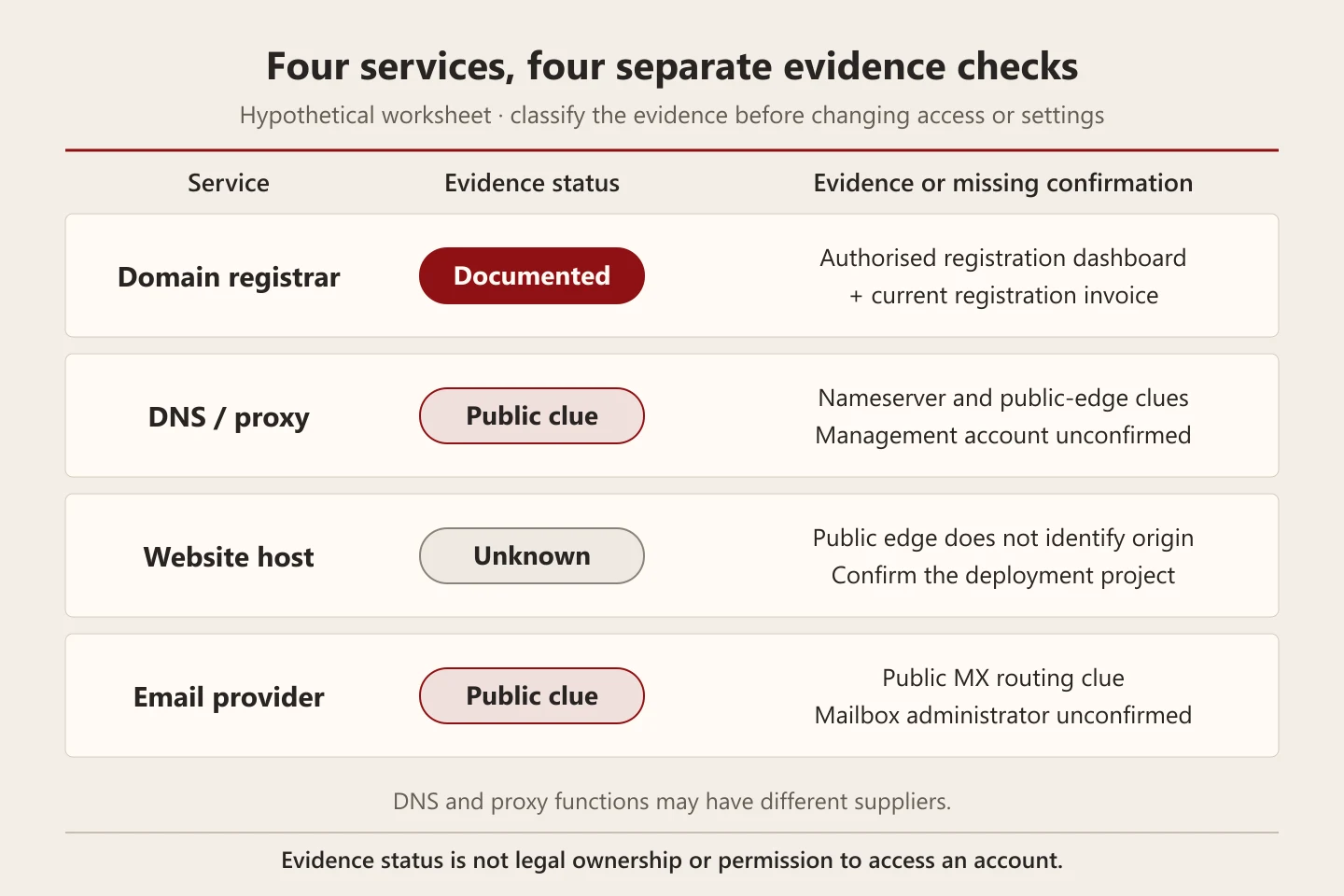
The following original worksheet is a hypothetical example, not an audit of a Biaway client. It deliberately leaves several questions unresolved. Documented means that the named service has supporting current records. Public clue means that a public technical signal was observed. Unknown means that the available evidence does not establish the answer. These labels do not determine legal ownership or authorise access.
DNS and proxy are grouped into one discussion row to keep the example compact; they remain different functions and may have different suppliers. Split that row in your real register when necessary. Add the responsible business role and the next evidence request to every unresolved item, so that a tidy-looking table does not hide an incomplete handover.
Scroll the table sideways to read every column.
| Service | Evidence status | What is available | What remains to confirm |
|---|---|---|---|
| Registrar | Documented | Authorised registration dashboard and current registration invoice | Responsible renewal contact and agreed recovery route |
| DNS / proxy | Public clue | Nameserver and public edge observations | The management account and authorised operator for each function |
| Website host | Unknown | A public edge result does not establish the deployment or origin | Deployment project or provider confirmation through an authorised contact |
| Public clue | The MX route is visible | Actual mailbox administrator and the intended support route |
Resolve the unknown host through the business's own records
Suppose a hypothetical owner finds a registration invoice, a Cloudflare lookup result and a separate email subscription. The owner still cannot say where the website is deployed. Ask the current developer or authorised administrator to identify the live project, the domain attached to it and the provider's support route. Request a redacted record connecting that project to the published hostname, rather than a screenshot of an unrelated account home screen.
If a supplier handles the infrastructure on the business's behalf, record that arrangement and the agreed escalation contact. The business may not have direct control of every underlying system. Where access or ownership is disputed, use the provider's supported recovery or contractual process; a DNS clue is not permission to reset someone else's account. Preserve unknowns until a responsible person confirms them.
Send a bounded evidence request before ordering a change
A useful request names the intended outcome and the missing fact. For example: 'We want to update our bilingual service pages. Please confirm which live project serves the main website, who can approve a deployment, and whether this change affects the separate email service. We are requesting identification only; no DNS transfer or cancellation is approved.' Adapt the request to your own authority and scope.
Send redacted evidence through the agreed support channel. Do not paste passwords or full customer messages into an enquiry form. Ask the provider to explain any proposed change separately from its identification work, including which service it affects and how the result will be checked. This keeps an information request from becoming an unplanned migration.
- Exact domain or hostname and the customer function involved.
- The planned task, such as a page edit, renewal review or separately approved migration.
- Current evidence references and the specific unresolved provider or responsibility.
- The authorised decision-maker and a safe route for granting any necessary access.
- A clear statement of what is approved now and what needs a separate proposal.
Protect both website and quotation-email routes across Saudi coverage
Imagine a supplier in Saudi Arabia whose website explains collection in Hofuf and delivery to Mubarraz within Al Ahsa. Its team also receives quotation requests from Dammam and Khobar through a website form and replies from a branded mailbox. Before a website change, identify both the form's responsible operator and the email administrator. Confirming the website host alone does not establish who can investigate a missing quotation reply.
For remotely coordinated Riyadh and Jeddah enquiries, the same team may depend on that mailbox even when no local visit is offered. Preserve the approved service information and contact route while documenting providers. A customer's city does not identify the server's location or create a new branch. Biaway works online and can discuss a bounded website review; this example makes no claim about Biaway client sites, local offices or delivery operations.
Finish with a usable provider register and a separate work scope
The identification task is complete when the relevant services have a current evidence reference, an authorised operational contact and a clear remaining-unknowns list. Record who will maintain the register after a supplier or staff change. If a domain has actually expired, follow the separate recovery process; do not confuse discovering a registrar with restoring a registration. If maintenance is changing hands, use the existing handover checklist after the providers are known.
Biaway's published hosting scope is for Biaway websites, and its maintenance package covers agreed minor work and technical checks. An unfamiliar platform, access recovery, mailbox administration or migration may need a separate assessment or another specialist. Share the intended task and current provider evidence first. A clear proposal should say what will be checked, what access is needed and which responsibilities remain with the business or its existing supplier.
References: Review website maintenance scope · Prepare an authorised maintenance handover · Follow the separate expired-domain recovery guide
How this guide was prepared
Prepared with AI assistance, with platform and accessibility claims checked against the primary sources below at publication. The planning frameworks are Biaway’s editorial recommendations. Examples labelled illustrative are not client stories or measured results. Platform features and requirements can change.
- cPanel: identify your hosting provider
- Google Cloud: finding your domain host
- Cloudflare: DNS proxy status
- Cloudflare: DNS record types
- Cloudflare Pages: deployment platform overview
- Review website maintenance scope
- Domain and hosting: one provider or separate?
- Prepare an authorised maintenance handover
- Follow the separate expired-domain recovery guide
Your questions.
01Does WHOIS or registrar information tell me who hosts my website?
It can help identify the registration provider, but registration, DNS and website hosting can be separate. Confirm the live deployment through current records or an authorised provider rather than assuming the registrar hosts everything.
02Why does a hosting checker show Cloudflare?
The result may describe a visible proxy or CDN, or Cloudflare may also provide the deployment platform. A public name alone does not settle which service is used. Check the actual project and account arrangement.
03Does knowing the MX record identify the email account owner?
No. It provides a mail-routing clue. Confirm the mailbox service, authorised administrator and support route through the business's approved records; a public DNS result is not access permission.
04Should I change nameservers to discover the real host?
No. Identification should start with read-only evidence and authorised records. A nameserver or routing change is a separate operational change that needs its own reason, scope and verification.
05Can I ask Biaway for help if my existing provider is unknown?
Share the domain, intended task and a redacted list of known services. Biaway can discuss whether a focused website check fits its scope. Do not assume account recovery, specialist infrastructure work or email migration is included.