Should your quotation form accept drawings and photos?

Add an attachment field only when a file helps the team assess the request and someone can handle it responsibly. A drawing, reference photograph and confidential project document do not need the same collection route. Decide what the first enquiry really needs, then scope the storage, access and failure states before approving the feature.
In this guide
Start with the decision the attachment will help you make
An upload is useful when the quotation team needs information that a short written description cannot convey well. A reference photograph can show a furniture style, while an approved dimensioned drawing can support a later technical discussion. Collecting every possible document at first contact creates work without necessarily improving the initial response.
Review several anonymised enquiries with the people who prepare quotations. Identify the point at which they genuinely need a file. If the first decision is simply whether the business offers that service, a description and contact route may be enough. Keep an optional upload optional unless the team can explain why every suitable buyer must provide it.
Separate first-contact material from project documents
A public enquiry form is not automatically the right place for confidential plans, identification documents or a large working archive. Agree a later controlled exchange when the sales conversation reaches that stage. Tell customers what not to send, and make that instruction visible before file selection rather than burying it in a message after submission.
For a fictional made-to-order furniture supplier, the first enquiry might accept one room reference photo and an approximate written requirement. Detailed measurements and approved production drawings can follow through an agreed process. A reference image does not establish that the dimensions are accurate or that a design is technically feasible; the quotation team still has to confirm those points.
Write the upload scope as a small decision register
The worksheet below is an original planning example, not a universal security specification or a promise about Biaway's existing contact form. Replace its examples with the file types your own team can review. Record the approval owner, because the developer cannot decide which customer documents the business genuinely needs.
Choose limits from real working samples and platform constraints. Do not copy an arbitrary file-size allowance from another site. If the business cannot define a safe handling route for a required file, record a follow-up method instead of silently accepting it into a general inbox.
Scroll the table sideways to read every column.
| Decision | Example requirement | Evidence to accept |
|---|---|---|
| Purpose | Initial visual reference, not final production approval | Sales team explains how it changes the next question |
| Permitted files | Only the agreed image or document formats | Harmless allowed and disallowed samples are tested |
| Capacity | An explicit file count and size limit | Published instructions match actual enforcement |
| Access | Only authorised reviewers can retrieve the file | An unrelated session cannot retrieve it |
| Retention | An agreed owner and removal process | Deletion and any retained copies are explained |
| Failure route | Continue without an optional file or use a suitable follow-up route | The customer does not lose the written enquiry |
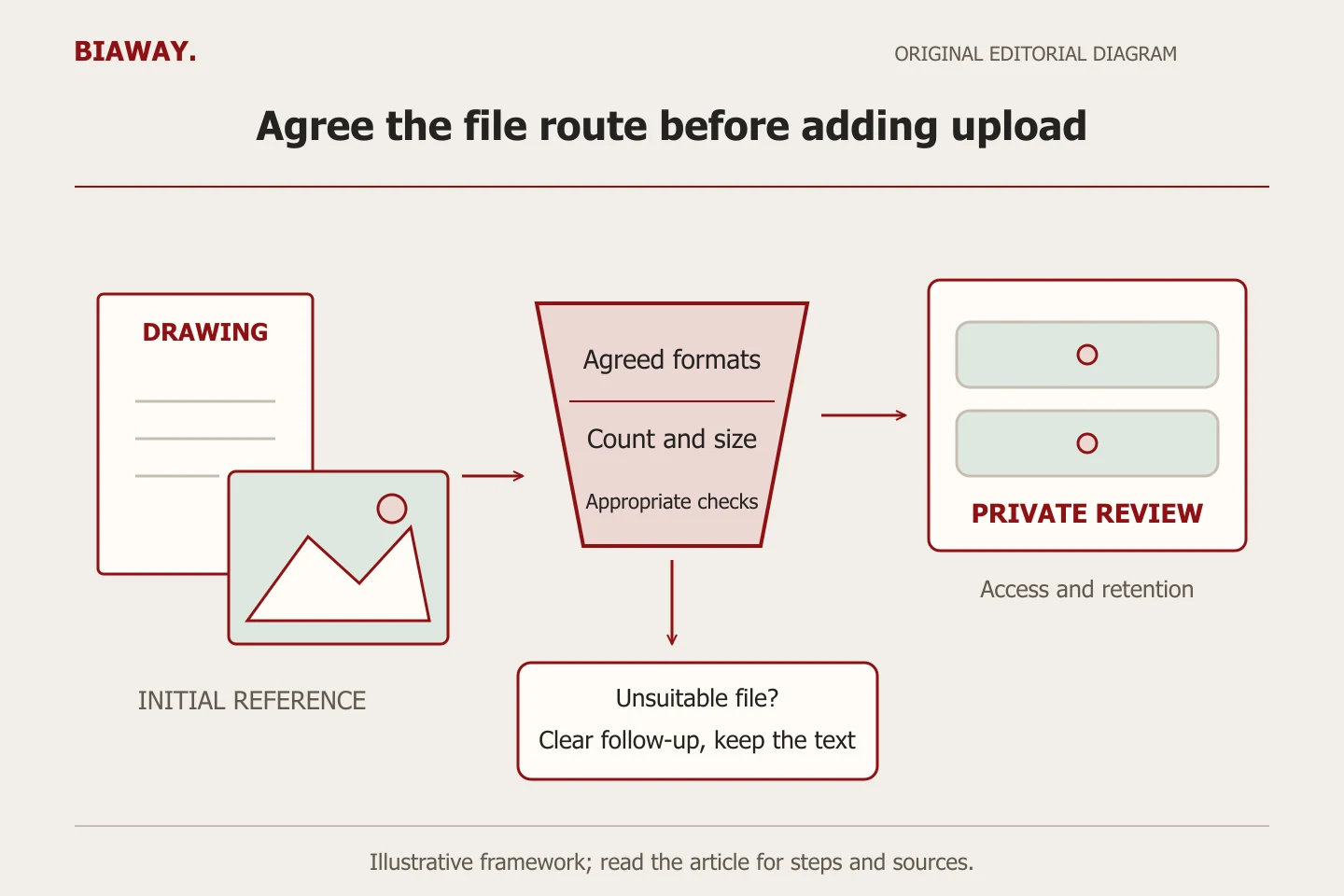
Ask for handling controls, not just a file picker
MDN explains that the file input's accept setting guides selection; it does not replace server-side validation. OWASP recommends layered controls including necessary file types, size limits, validation, safe stored names, restricted access and appropriate scanning. Its guidance also distinguishes protected storage from files made publicly retrievable. A single extension check is not a complete upload design.
Ask the implementer to describe the actual path in plain language: where a file first arrives, which checks occur before anyone opens it, where it remains, who can retrieve it and how it is removed. Clarify what the supplier operates and what a third-party platform operates. A technical review should match that architecture; a reassuring shield icon or a paid plugin name is not acceptance evidence.
References: OWASP: File Upload Cheat Sheet · MDN: file input and accepted file types
Make restrictions understandable before the upload
Place the accepted formats, count and size limit beside a persistent label. W3C's form guidance supports clear instructions about required input. Write natural Arabic and English explanations with the same conditions, including what happens when a customer does not yet have a suitable file.
Use distinct feedback for a rejected format, a file above the agreed limit and a connection failure. Preserve the useful written fields when a correction is possible. If an optional file fails, let the customer understand whether the enquiry can continue without it. Do not call an upload received merely because a file name appears in the browser.
References: W3C WAI: form instructions
Test the file journey with harmless samples
Prepare synthetic documents containing a clear TEST label and no customer information. In an isolated environment, test an allowed small file, an allowed file near the stated limit, a file above it, a disallowed format and an interrupted attempt. Add an Arabic filename and a mixed Arabic/Latin filename to check that the customer and reviewer can identify the intended document.
For each case record the language, device, input, expected result and observed result. Confirm that the stored item belongs to the right enquiry and that access restrictions apply to retrieval, not only to the page containing the link. Test removal according to the agreed process. Arrange any necessary live delivery check separately with the authorised recipient and exclude it from enquiry counts.
Keep the project destination separate from the attachment
An illustrative furniture business in Saudi Arabia may receive reference photos for work in Hofuf and Mubarraz within Al Ahsa. Collect the intended project location as a clear field; a photo filename or embedded location should not decide the quotation destination. For Dammam and Khobar enquiries, confirm whether the request concerns supply only, measurement or installation before asking for more detailed documents.
For Riyadh and Jeddah requests handled remotely, explain which files help assess the job and which service conditions still need confirmation. The same upload limit should not silently change with the chosen city unless the workflow genuinely requires a documented difference. Biaway works online and can plan this intake with your team; these examples imply no Biaway branches, client projects or nationwide installation promise.
Separate the feature price from its ongoing responsibility
A quotation should identify design, validation, storage, access management, notifications, testing and ongoing operating responsibilities. An attachment feature may require custom work beyond a standard contact form. Confirm recurring platform or storage charges from the actual proposal rather than assuming that a website package includes unlimited document handling.
Retain the agreed decision register and acceptance results with the website handover. Name the person who changes limits, removes files and handles a failed or suspicious submission. Recheck the route after changing a form provider or storage setting. The useful result is an understandable, controlled enquiry process; an attachment field by itself does not guarantee more leads or better rankings.
How this guide was prepared
Prepared with AI assistance, with platform and accessibility claims checked against the primary sources below at publication. The planning frameworks are Biaway’s editorial recommendations. Examples labelled illustrative are not client stories or measured results. Platform features and requirements can change.
Your questions.
01Must every quotation form accept files?
No. Add uploads when they help an actual quotation decision and the business has an agreed handling process. A description followed by a controlled exchange can be the better first step.
02Does allowing only PDF files make uploads safe?
No. An allowed extension is one control, not a complete assessment of content or access. Ask the implementer to define layered validation, storage and handling for the real platform.
03Should large project files be emailed automatically to everyone in sales?
Agree who needs access and how files are reviewed. Broad distribution is not a substitute for a controlled retrieval and retention process.
04Can a basic website quotation assume file uploads are included?
Do not assume it. Describe the file types, capacity, access and operating responsibilities so the supplier can explicitly scope the feature.