What should an Arabic and English enquiry form pass before launch?
A form needs to remain understandable when someone uses a keyboard, makes a mistake or receives an error. Use this focused acceptance worksheet to test the Arabic and English enquiry journey, document reproducible faults and agree a repair that can be verified.
In this guide
Accept the enquiry task, including its failure states
A contact form is ready for review when a person can understand the fields, move through them, correct an error and recognise what happened after submission. A screenshot of the empty form proves very little about those tasks. For an Arabic and English website, test both versions with the same acceptance scenarios rather than approving the English form and checking only the Arabic colours.
This guide provides a focused supplier-acceptance worksheet. It is not a complete accessibility audit or a claim of WCAG conformance. Use it to identify specific defects and agree repairs, then obtain a broader assessment where the project requires one. Keep real customer data out of testing and use an isolated environment with outbound delivery disabled.
Give every field a persistent, understandable label
Check the visible field name and its programmatic association with the control. W3C’s form guidance recommends descriptive labels linked to their controls. Placeholder text can help illustrate a format, but it disappears when a person types and should not carry the whole burden of identifying the field.
Separate required from optional information and explain unusual format constraints before the error happens. A project enquiry usually does not need a full postal address or sensitive account information at the first step. Ask the business which fields are necessary for a useful response; a shorter form is not automatically sufficient if it omits essential project context.
Have a language reviewer read the Arabic field names as a customer would. An accurate English term can become ambiguous when translated literally. If a field means the location where the service is needed, label it that way rather than using a vague word such as location that could mean the user’s current location.
References: W3C WAI: associated form labels
Check keyboard movement and mixed-direction text
Move through the form with the keyboard and watch where focus goes. Each interactive control needs a visible focus state, and a sticky header or consent panel should not conceal the active control. Test the actual tab sequence; a visually mirrored Arabic layout does not excuse a confusing reading or interaction order.
Arabic paragraphs and labels need the appropriate base direction. Email addresses, telephone values and mixed-script project names need deliberate handling rather than blindly reversing every field. W3C explains that dir=auto can help with unknown user-entered text by using its first strong character; it is a tool to test, not a guarantee that every mixed-direction string will look right.
Use synthetic examples containing Arabic words, an English brand name, punctuation and digits. Verify the value the user entered remains correct when the field loses focus and when an error appears. Test on a phone with the keyboard open as well as on a desktop; the position of an error can become unusable when the visible area is smaller.
References: W3C Internationalization: text direction and dir=auto · W3C WCAG 2.2: visible keyboard focus · W3C WCAG 2.2: focus not obscured
Write errors that identify the field and the repair
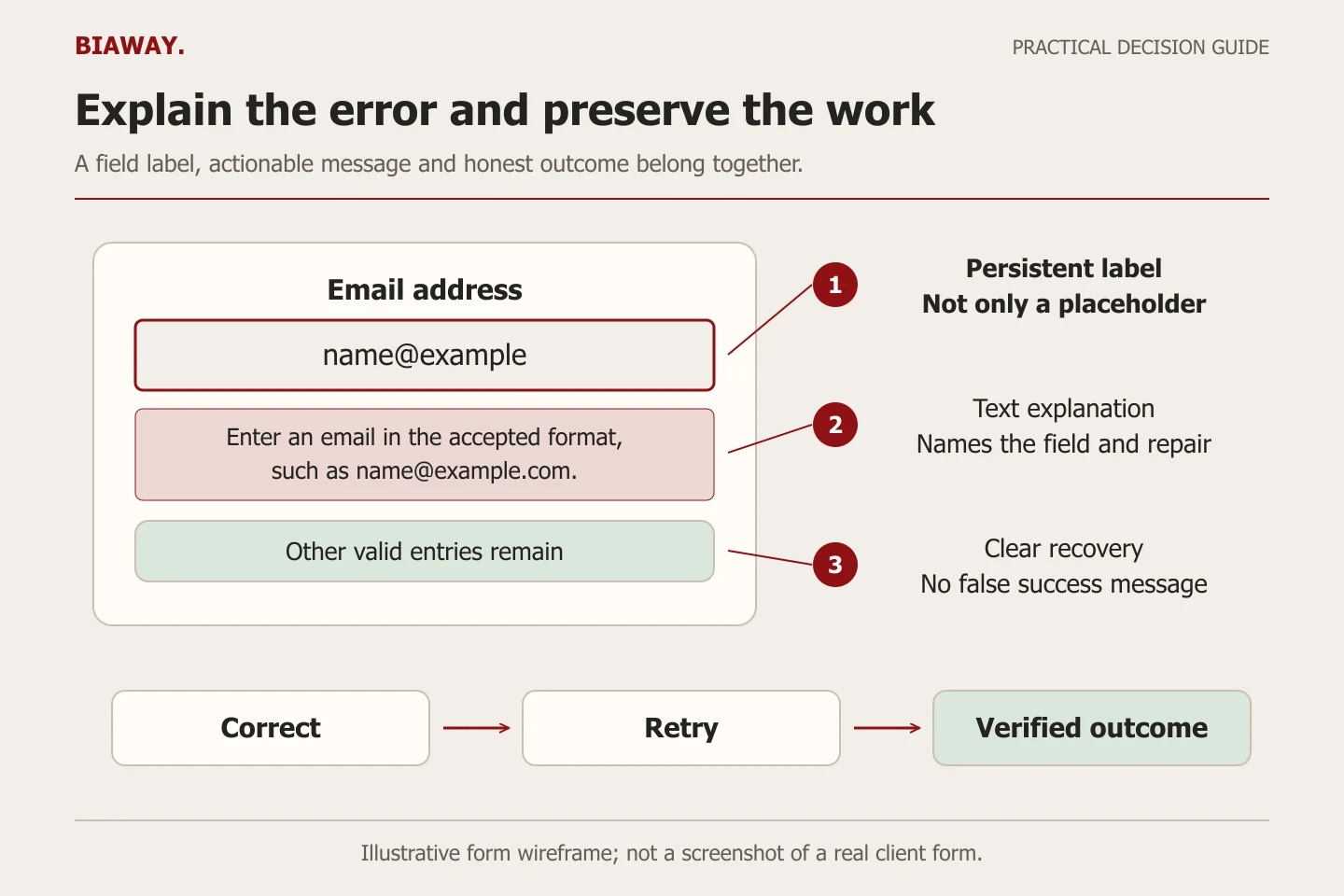
A red border alone does not explain what failed. W3C requires detected input errors to be identified and described in text. Pair the field’s name with a concise correction that reflects the actual accepted format. Avoid scolding language, unexplained codes or an instruction to contact support for a mistake the user can fix.
Keep validation errors separate from a network or receiving-service failure. If the form cannot reach its provider, telling the customer their email is wrong is misleading. Do not show a success message merely because the button was pressed. The visible state should match the result the application actually knows.
Scroll the table sideways to read every column.
| Situation | Useful English message | Useful Arabic message |
|---|---|---|
| Required service missing | Choose the service you want to discuss. | اختر الخدمة التي تريد مناقشتها. |
| Email format rejected | Enter an email address in the accepted format, such as [email protected]. | أدخل بريداً بصيغة مقبولة مثل [email protected]. |
| Required project description empty | Add a short description of your project. | أضف وصفاً مختصراً لمشروعك. |
| Receiving service unavailable | Your request could not be sent. Your entries are still here; try again or use the listed contact option. | تعذّر إرسال طلبك. ما زالت بياناتك موجودة؛ حاول مجدداً أو استخدم وسيلة التواصل المذكورة. |
| Request accepted by the configured provider | Your request has been submitted. Here is what happens next. | تم تقديم طلبك. إليك الخطوة التالية. |
References: W3C WAI: form error and success notifications · W3C WCAG 2.2: error identification
Test recovery, not only error appearance
In a controlled test, leave a required field empty and submit. Check that the person can find the error, understand it and return to the relevant control. A prominent error summary with field links can help on longer forms; a short form may use a simpler pattern. The implementation should expose the relationship between field and error to assistive technology.
For dynamic messages, ask the developer to demonstrate appropriate announcement with a supported screen reader. Do not declare that a message is accessible just because an aria attribute exists in the source. Save the browser and assistive-technology combination tested, the steps and the observed result.
Then correct the value and retry. Preserve useful entries where appropriate so an avoidable error does not make the person start again. Test an interrupted request and a repeated click; distinguish a safe retry from an accidental duplicate submission. These are practical acceptance scenarios, not a claim that every form must use one identical implementation.
- Complete the form with synthetic data using the keyboard; record focus order and visibility.
- Introduce one validation error and check the field name, text explanation and route back to the control.
- Test several errors together and confirm none remain discoverable only by colour.
- Correct the values and verify that useful entries remain and the next state is understandable.
- Simulate provider failure in isolation and ensure the form does not announce success.
- Check the success state and the documented next step, without inventing a response-time promise.
References: W3C WAI: form error and success notifications
Test location choices against actual Saudi service conditions
An illustrative supplier may need a service-area choice covering Hofuf and Mubarraz within Al Ahsa, with different delivery arrangements for Dammam and Khobar. Requests from Riyadh and Jeddah may be accepted only for a remotely delivered service. The form should describe those actual conditions in both languages, rather than allowing every Saudi Arabia location and rejecting the customer after submission.
Do not make the city list evidence of a physical branch. Biaway operates online, and the purpose of this example is to test clear eligibility and routing. If the form uses a dropdown, verify keyboard operation and understandable option labels. If the area is unknown, provide an honest route to discuss availability rather than silently changing the selection.
Hand the supplier a defect record they can reproduce
Record the page and language, device or viewport, browser, action, expected behaviour and observed failure. Attach a cropped screenshot or short recording with synthetic values. A report such as Arabic error text is clipped behind the sticky footer at this width is more actionable than the mobile form feels awkward.
Classify the effect on the enquiry task. A hidden required field or impossible keyboard path can block a customer; a small spacing inconsistency may not. Agree the repair, owner and retest evidence rather than treating every issue as either cosmetic or a complete rebuild.
Keep end-to-end delivery separate from interface acceptance. A correctly announced success state confirms what the application reports, not necessarily that the intended colleague read the enquiry. Coordinate any real delivery test separately. Biaway can discuss a focused form repair or website scope; do not assume a small maintenance allowance includes a comprehensive accessibility audit.
How this guide was prepared
Prepared with AI assistance, with platform and accessibility claims checked against the primary sources below at publication. The planning frameworks are Biaway’s editorial recommendations. Examples labelled illustrative are not client stories or measured results. Platform features and requirements can change.
Your questions.
01Is a placeholder enough to label a field?
It should not be the only identification. Use a persistent, understandable label associated with the control, and reserve placeholder text for optional examples where useful.
02Must the whole Arabic form be reversed?
No. Set appropriate Arabic direction and test the actual reading and keyboard order. Email addresses, digits and mixed-script input need intentional handling rather than indiscriminate mirroring.
03Does passing an automated accessibility scan prove the form is usable?
No. Automated checks can find some defects, but keyboard use, error recovery, natural Arabic wording and assistive-technology behaviour need appropriate direct testing.
04Should I submit repeated tests through the public contact form?
Use an isolated environment with delivery disabled for routine testing. Arrange any necessary end-to-end receipt test with the authorised team, label it and keep it out of customer-performance counts.