Why do Google Ads and GA4 show different conversion numbers?

A difference between Google Ads and GA4 does not by itself prove that tracking is broken. First establish whether you are comparing the same action, date basis, channels and counting rules. Then test the implementation. A button click, an Analytics key event, an Ads conversion and a qualified customer enquiry can describe different stages of one journey.
In this guide
Write down exactly what each number counts
Google Analytics distinguishes key events used to understand important site behaviour from conversions used for advertising measurement. Its Advertising area can include conversion reporting, while other reports show key-event data. Do not compare a total labelled “key events” with an Ads conversion total and assume the labels describe the same measure.
Start with the action definition in plain language: “successful enquiry submitted” is more precise than “lead”. Record the event name, Ads action name, source, account/property and report. If the business's sales team means an accepted enquiry when it says “lead”, put that in a separate field rather than silently redefining an on-site event.
References: Google Analytics: conversions versus key events
Use a comparison sheet before changing tags
Capture both reports with their filters visible. Work through the table in order and change one comparison setting at a time. The worksheet is an editorial diagnostic process: a difference found in one row is a hypothesis to verify, not automatic proof of the cause.
In available Analytics conversion reports, you can select reporting perspectives and compare Analytics or Ads settings. Google notes that availability varies by property. If a control is absent, record the report you actually have; do not assume an older screenshot or menu path must match your account.
Scroll the table sideways to read every column.
| Check | Record on both sides | Why it matters |
|---|---|---|
| Action identity | Event/action name and source | A click is not necessarily a completed form. |
| Population | Campaign, channel and other filters | All website activity may exceed the advertising subset. |
| Time | Date range, time zone and interaction/conversion basis | The same journey can fall on different days. |
| Counting and attribution | Count method, eligible channels, model and window | Credit and counting may differ. |
| Reporting column | Conversions, All conversions or key events | The included actions may not be equivalent. |
| Freshness | Export time and processing delay | A recent total may still change. |
References: Google Analytics: cross-channel conversion reporting · Google Ads: Analytics conversion imports and discrepancies · Google Analytics: attribution settings and time zones
Worked example: one enquiry, two reporting dates
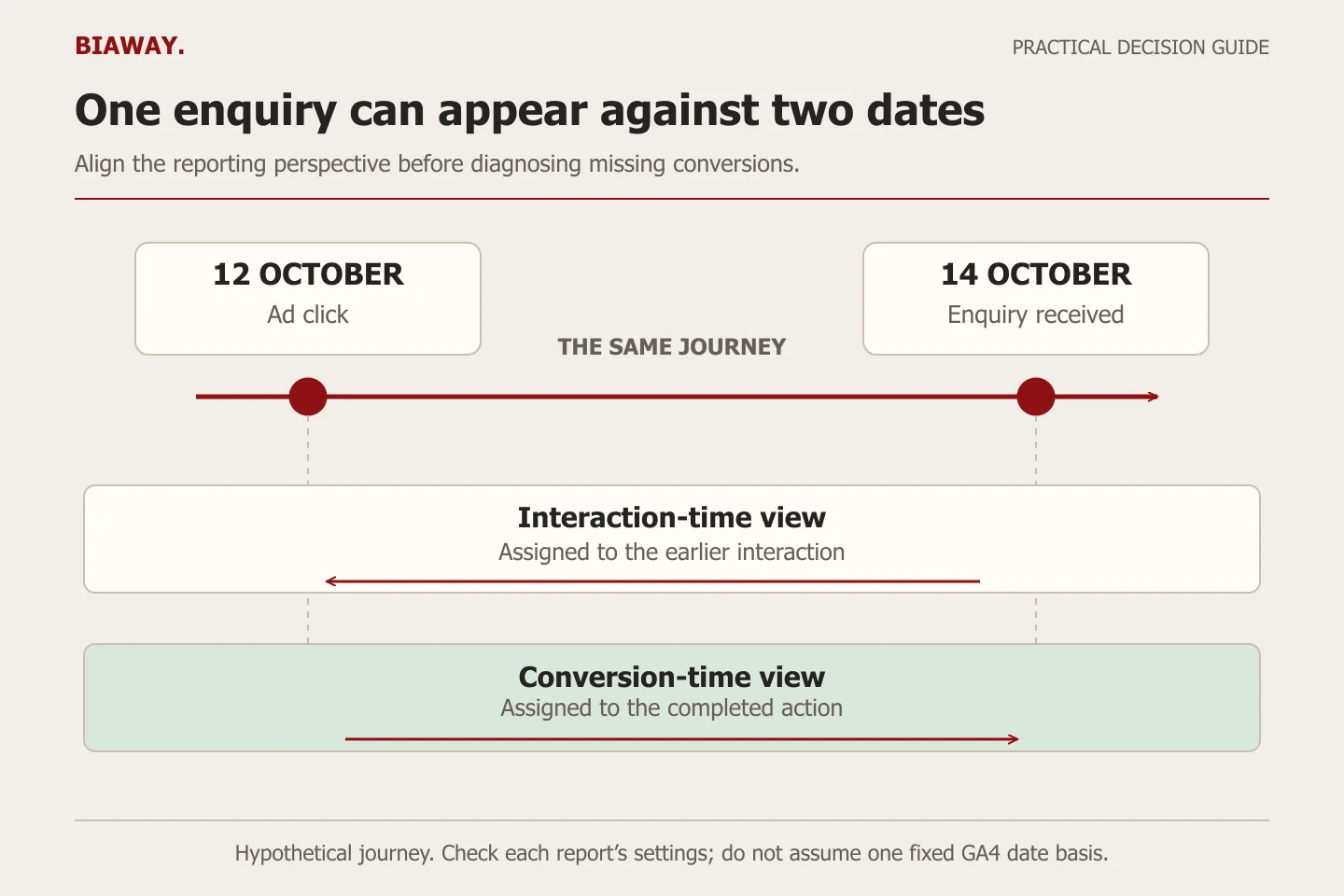
Hypothetical example, not a Biaway client result: a buyer clicks an ad on 12 October and successfully sends an enquiry on 14 October. An interaction-time view places the outcome with the earlier ad interaction; a conversion-time view places it with the completed action. A report limited to 14 October can therefore look different even though both systems refer to the same journey.
Google Ads' standard conversion reporting generally uses the interaction date, while conversion-time columns offer another view. Current Analytics conversion reporting can also offer interaction-time and conversion-time options. Check the selected perspective instead of repeating the outdated rule that every GA4 report must always use only the conversion date.
Scroll the table sideways to read every column.
| View | Date used in this example | Comparison question |
|---|---|---|
| Interaction-time view | 12 October | Does the other report use the same interaction basis? |
| Conversion-time view | 14 October | Does the date range include the completed action? |
| Business enquiry record | 14 October | Is the enquiry accepted, duplicate or unsuitable? |
References: Google Analytics: cross-channel conversion reporting · Google Ads: Analytics conversion imports and discrepancies
Align counting, attribution and the action set
Check whether the action counts one or every eligible conversion, then compare its attribution window and eligible channels. Check time zones too. A similar-looking name does not establish that an Analytics key event and an Ads action use the same settings.
In Ads, primary actions appear in Conversions and support bidding when their standard goal is used. Secondary actions generally appear in All conversions for observation; a custom goal can also use secondary actions for bidding. Review the campaign's actual goals instead of inferring the setup from one column.
Do not change attribution merely to make two totals match. The question is whether the settings answer the business's reporting purpose consistently. Save the existing settings and the reason before a change, because the comparison itself should not silently alter campaign optimisation.
References: Google Analytics: attribution settings and time zones · Google Ads: primary and secondary conversion actions
Test the journey, then look for duplicate measurement
Run an authorised test submission and note its timestamp and expected behaviour. Check whether the event records a completed success or only the initial button click. If a failed form still triggers the success event, repair that definition before comparing campaign outcomes. Also check whether refreshing a confirmation page or repeated interaction fires the action again.
Inventory the actions representing the same business outcome. A native Ads action and an Analytics-based action may both describe one form submission. Decide which measurement is authoritative for bidding and which is retained for observation; do not add their totals and call them two customers.
Google's import guidance calls for the correct linked accounts, auto-tagging and preservation of the click identifier through the website journey. Check redirects and the relevant consent configuration with the person responsible for measurement. Do not bypass a visitor's choice to force matching totals. Allow for processing delay before concluding that an authorised test has been lost.
- One expected successful action and one documented test timestamp.
- A distinction between failed attempts, repeated events and completed requests.
- An inventory of overlapping Ads and Analytics actions.
- A check of account linking, redirects and the intended consent behaviour.
References: Google Ads: Analytics conversion imports and discrepancies
Keep platform reconciliation separate from lead qualification
Suppose a hypothetical test produces twelve recorded form submissions. The business identifies two repeat submissions and four requests outside its service scope, leaving six suitable enquiries. Twelve recorded actions and six suitable enquiries are different measures; neither number alone explains which platform recorded the journey correctly.
Keep the event reconciliation sheet and the business qualification sheet linked by a privacy-conscious internal process. The first checks measurement; the second helps evaluate whether advertising attracts work you can serve. Do not send personal enquiry details into analytics labels simply to make matching convenient.
When reporting to an owner, state the unresolved difference, the settings already aligned and the next diagnostic step. Avoid “tracking is fine” if only one event was seen, and avoid “all leads were lost” if the difference is an unexamined reporting filter.
Use one reporting convention across Saudi service areas
A business covering Hofuf and Mubarraz within Al Ahsa may have its website administrator in Dammam, sales follow-up in Khobar, and customers in Riyadh or Jeddah. Agree one reporting time zone and one definition of a suitable Saudi Arabia enquiry across that workflow. City-level segmentation should answer a delivery or qualification question, not create eight competing definitions of conversion. Biaway can coordinate measurement review online without implying local offices or guaranteed results in any city.
Ask for an explained difference and a documented next step
A useful handover includes the action inventory, screenshots of settings, test evidence, the chosen reporting columns and any remaining limitation. Keep these with the campaign brief so a future manager does not create another conversion action simply because an existing one was not explained.
Biaway's published advertising reports include spend, impressions, clicks, CTR, CPC and observations, with lead and conversion figures where tracking is available. Discuss the actual diagnosis or implementation work before assuming it is covered by basic monitoring. A reported conversion remains a defined action, not proof of a completed sale.
References: Biaway: advertising reporting scope
How this guide was prepared
Prepared with AI assistance, with platform and accessibility claims checked against the primary sources below at publication. The planning frameworks are Biaway’s editorial recommendations. Examples labelled illustrative are not client stories or measured results. Platform features and requirements can change.
Your questions.
01Should Google Ads conversions exactly equal all GA4 key events?
Not without aligning the action, report scope, counting, date basis and attribution settings. First compare equivalent measures. An all-channel website total and an advertising conversion total can legitimately describe different populations.
02Does GA4 always report conversions on the day they happened?
Check the report. Current Analytics conversion reporting can provide conversion-time and interaction-time options. The chosen perspective, along with the date range and time zone, determines the comparison.
03Can I add a native Ads conversion and an imported GA4 conversion together?
Only if you understand that they represent different outcomes. If both measure the same successful form, their sum can overstate the business outcome. Document one bidding definition and an intentional observation setup.
04Why is a test not visible immediately?
Processing and import delay can affect recent data. Verify the event, action, linked accounts and date range, then allow the documented processing time before treating absence from one report as a tracking failure.
05Which total should I use to judge lead quality?
Use a consistent business qualification process alongside the platform measurement. A recorded form event does not establish that the request is genuine, suitable or accepted by the sales team.