Which searches should your Google Ads campaign exclude?

Start with searches you cannot serve, not a giant list of supposedly bad words. A negative keyword is useful when it excludes the wrong job, product or intent. The same word can be valuable in another context: a person asking for a free quotation may still want a paid service. This guide shows how to document exclusions, choose their scope and check what changed.
In this guide
Define the work you will not accept
Write a short service boundary before touching the account: what you sell, what you do not sell, the customer you serve and the enquiry you want. For example, a company building business websites might accept redesign projects but not recruit developers or sell coding courses. Those distinctions are more useful than a generic negative list copied from another advertiser.
Review a query as a complete request. A search containing “cheap” may signal a poor fit, or simply a buyer comparing quotations. A search containing a city name may be relevant to an online provider. Record a business reason for excluding it; do not treat lack of a conversion after a few clicks as proof that its intent is wrong.
- Irrelevant service: the buyer needs something the business does not provide.
- Irrelevant purpose: a job seeker, student or supplier is looking for a different transaction.
- Uncertain fit: keep for review until the offer, landing page and enquiry quality are understood.
Choose the narrowest exclusion that solves the problem
For Search campaigns, negative broad, phrase and exact matching use different rules. The table describes the words in the negative itself, not the wider meaning of a positive keyword. These are eligibility rules, not a prediction of which searches will occur.
Google says negative keywords do not expand to synonyms or singular/plural forms; its current guidance says casing and misspellings are handled automatically. Review Arabic and English wording separately instead of assuming that excluding one language removes the other.
Scroll the table sideways to read every column.
| Negative type | What it excludes | When to consider it |
|---|---|---|
| Broad: website jobs | A query containing both words, in either order | A combination that is always outside the service. |
| Phrase: "website jobs" | Those words together in that order, with other words allowed | A specific unwanted phrase. |
| Exact: [website jobs] | Those words in that order without extra words | One unwanted query where wider exclusions could block buyers. |
References: Google Ads: negative keyword behaviour and match types
Worked example: protect quotation requests while excluding job searches
Hypothetical example, not a Biaway client result: a website studio receives the four queries below. It offers paid business websites and free initial quotations, but no recruitment or training. The objective is to separate those intents without assuming that every price-sensitive search is worthless.
An exact exclusion for one unwanted query leaves other wording eligible; it does not build a complete recruitment filter. If the evidence supports a wider pattern, prepare specific English and Arabic recruitment phrases and test them against useful enquiries. Keep a dated change note so an accidental block can be reversed.
Scroll the table sideways to read every column.
| Observed query in the example | Decision | Reason |
|---|---|---|
| website design jobs | Exclude the job-seeking intent | The business is selling a service, not hiring. |
| free website design quote | Keep | A free quotation can lead to a paid project. |
| website design course | Exclude the training intent | Courses are outside the advertised offer. |
| website design price Saudi Arabia | Keep and assess enquiry quality | The buyer may be comparing a legitimate project. |
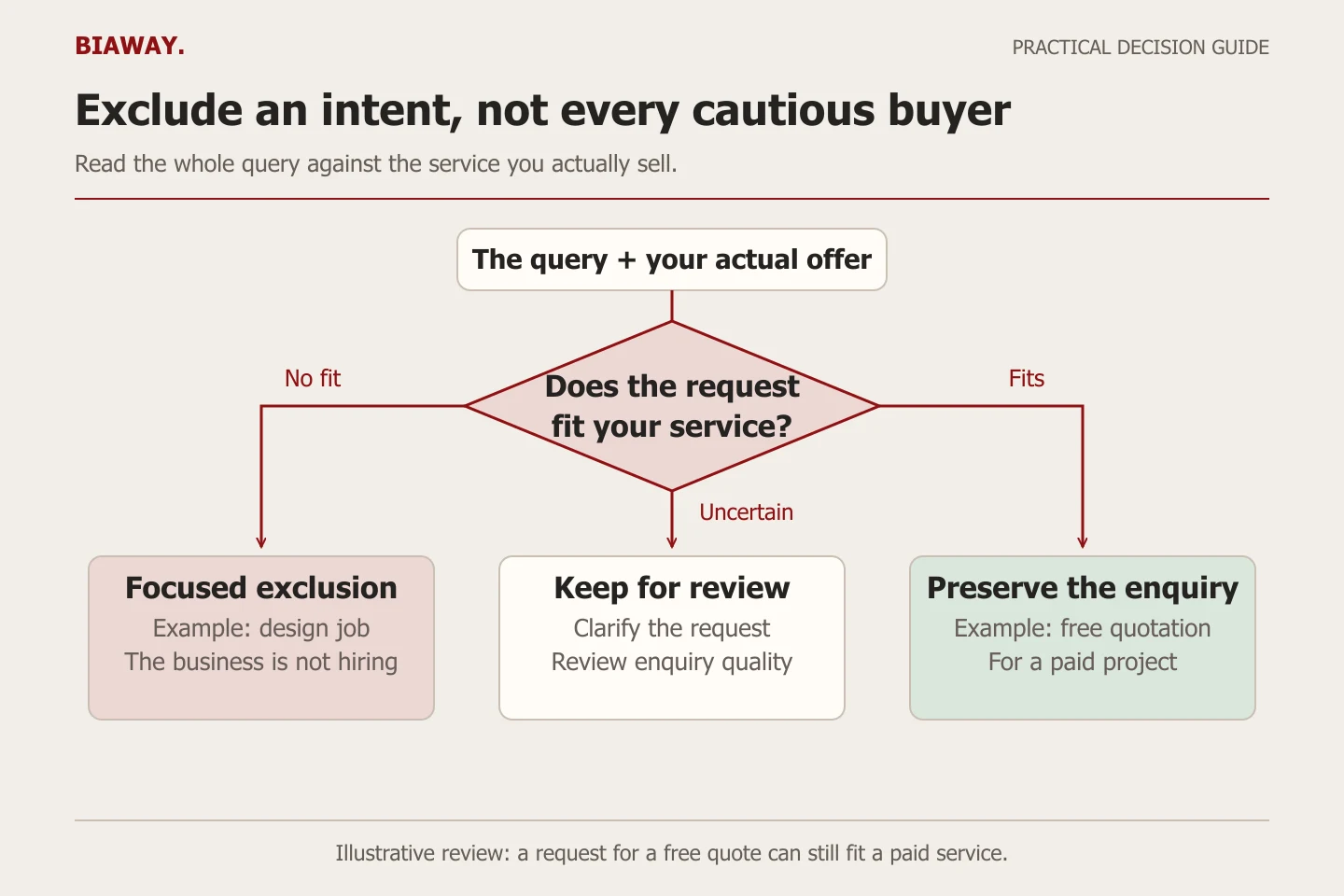
Put an exclusion at the level where its reason stays true
Use a campaign-specific decision for a service limitation that does not apply everywhere. A business may sell both website development and training; excluding course-related searches across the whole account would then undermine a real offer. Review existing lists before adding another one so the same rule is not scattered across several places.
Account-level negatives apply across eligible Search and Shopping inventory in relevant campaign types. That reach is useful only for exclusions that are genuinely universal. A negative that belongs to one landing page should not become an account-wide policy by convenience.
- Write the affected campaign or account scope beside every proposed exclusion.
- Check the proposed words against profitable services and useful buyer questions.
- Review older exclusions when the business adds a service or changes its coverage.
References: Google Ads: account-level negative keyword scope
Review actual queries and qualified enquiries together
In the search terms report, the Keyword column connects a visible query to the keyword that matched it. Use that connection to distinguish a bad query from a broad keyword that also brings appropriate enquiries. Keep the query, matched keyword, campaign, decision and reason in one review sheet.
The report does not reveal every search: Google omits some low-activity queries for privacy. Therefore, a blank or incomplete query list is not proof that all spend is fully explained. Compare the visible terms with campaign totals and lead quality, while marking the unobserved detail as unknown.
After a change, look for the intended outcome: fewer clearly irrelevant requests without losing the useful enquiry types you wanted. Review over a period appropriate to the business's volume and sales delay. Do not add dozens of negatives and change the offer simultaneously if you need to understand which change mattered.
References: Google Ads: search terms report and privacy limitations · Google Ads: use the keyword column in search terms reporting
Separate service geography from words inside a search
For a provider working online across Saudi Arabia, a buyer in Hofuf or Mubarraz within Al Ahsa may still be a good fit even when the query names another city. Treat Dammam and Khobar requests according to the actual delivery or meeting requirement, and assess Riyadh and Jeddah enquiries against the same service scope. Do not exclude these place names simply to tidy a report. If a service truly requires an on-site visit, document the real operating boundary and review location settings separately. Biaway's online service coverage does not imply an office in each city.
Ask for a reviewable exclusion log
A useful management report explains what was excluded, where the rule applies and why. It should also identify uncertain searches that remain under review. Ask for the underlying decision log, not just a growing count of negative keywords.
Biaway's published advertising-management fee is 400 SAR per month, separate from media spend. Its scope includes campaign structure, targeting, ad copy, monitoring and basic optimisation. Confirm the specific campaign and reporting work before launch; exclusions do not guarantee leads, sales or a particular cost.
References: Biaway: advertising management and separate media spend
How this guide was prepared
Prepared with AI assistance, with platform and accessibility claims checked against the primary sources below at publication. The planning frameworks are Biaway’s editorial recommendations. Examples labelled illustrative are not client stories or measured results. Platform features and requirements can change.
Your questions.
01Should negative keywords be exact match?
Use exact exclusions when you want to block one precise unwanted query without broadly removing other wording. Use phrase or broad negatives only when the wider excluded intent is genuinely outside the service. There is no rule that every negative must use the same match type.
02Should I exclude “free” from every campaign?
Only when that word reliably describes an offer you cannot serve. A free quote, consultation or delivery search can still concern a paid purchase. Inspect the full query and the promise on your landing page first.
03Will an English negative keyword block the Arabic translation?
Do not assume so. Review the wording your customers actually use in each language, including distinct terms with the same commercial intent. Apply the exclusion only where its meaning is genuinely irrelevant.
04How many negative keywords should a campaign have?
There is no useful universal target for a business's list. A small, justified set is easier to audit than a large collection of guesses. Add exclusions because of service boundaries or observed irrelevant intent, and remove rules that no longer fit.
05Why can an irrelevant search still appear after an exclusion?
Check the date range, the rule's scope, its match type and the actual words. Also remember that exclusions do not expand to all synonyms or singular/plural forms. Confirm the setting before assuming that Google ignored it.