Which product search and filters does your Saudi store actually need?

Choose filters that help a buyer eliminate unsuitable products using reliable facts. More controls are not automatically better: inconsistent dimensions, translated colours or stock rules can make a polished filter return the wrong set. Start with a few real shopping tasks and prove each result.
In this guide
Start with the choice a shopper needs to narrow
Write a few questions customers ask before choosing: will this fit, is this material suitable, which finish is available, and can the selected version be bought? Then identify which reliable product facts answer them. A filter deserves space when it changes a useful decision, not because the platform can display another list.
Separate searching for a known item from browsing a range. A buyer with a product reference needs a dependable lookup; a buyer choosing a desk may need dimensions and material. Sorting changes the order of a set, while filtering removes items that do not meet selected conditions. Brief those jobs separately so the implementer can demonstrate the intended result.
Make the source data consistent before designing controls
Choose units and approved values for each attribute. '120 cm' and '1200 mm' can describe the same width, but a poorly prepared catalogue may treat them as unrelated choices. Keep the factual value and its display label deliberate, and agree how missing values behave. An unknown measurement should not silently become zero or qualify for every range.
Distinguish product-level facts from variant-level facts. A sofa can come in several colours while only one colour is immediately available. Decide whether a result promises an available matching variant or merely a product that offers the colour somewhere in its range. Show the relevant choice on the destination page so the buyer does not have to reconstruct why it matched.
Approve expected results using a small sample
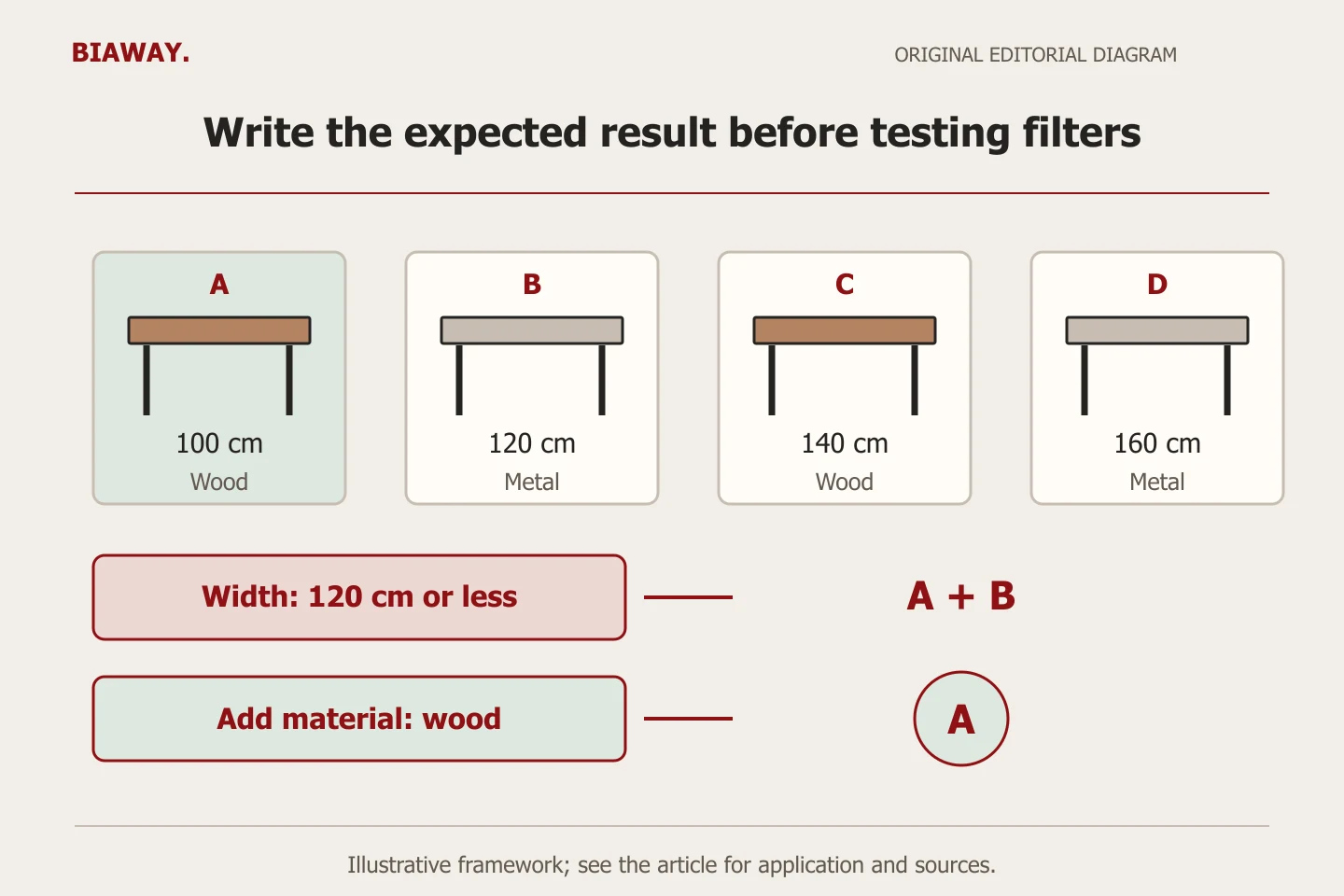
This original worksheet uses a hypothetical furniture catalogue. Choose real approved sample records when applying it. Before testing the interface, write down which products should remain after each choice. That expected set lets the owner detect a wrong result instead of accepting a filter simply because its menu opens.
Include an item with missing data and a combination that matches nothing. A useful empty state explains what happened, shows active selections and offers a clear way to loosen or clear them. It should not quietly replace the requested set with unrelated products while appearing to satisfy the search.
Scroll the table sideways to read every column.
| Buyer task | Data/control needed | Expected check | Exception to test |
|---|---|---|---|
| Find a desk within a stated width | One dimension unit and width filter | Only qualifying measured desks remain | Missing width is not a match |
| Choose a finish and available size | Consistent variant options | The matching sellable version is clear | Colour exists, chosen size does not |
| Locate a known product reference | Stable reference lookup | Correct item opens with recognizable identity | Unknown reference returns an honest message |
| Browse in Arabic, then English | Equivalent labels and values | Selections retain the same meaning | Two translations do not split one material |
| Undo a narrow selection on mobile | Visible selections and clear/reset action | The wider set returns as intended | Back navigation does not strand the buyer |
Check what the actual theme and platform can display
Shopify's current filter documentation distinguishes configured filters from filters a compatible theme actually displays. It also describes translatable labels and values, with limits for some filter types. Treat the live Arabic and English result as the acceptance evidence; an administrative screenshot alone does not prove that shoppers see the correct controls.
Ask which requirements are native and which need an app or custom implementation. Confirm how each added component is maintained and what happens if it is removed. Avoid buying advanced search because the source attributes are messy: an integration can still produce poor results when the underlying product facts are inconsistent.
References: Shopify: Search & Discovery filters
Keep shopper filters and search-engine discovery distinct
Google warns that combinations of filters can create many URLs. Decide which pages, if any, should be eligible for crawling and indexing, and have the implementer document the approach. Do not publish every combination as an SEO landing page or apply a copied blocking rule without reviewing the site.
Preserve a linked category-to-product path alongside the search interface. Google generally does not submit internal search queries while crawling. A shopper's convenient search tool and a crawler's route to the canonical product pages therefore need separate checks. A successful filter test does not establish Google indexing.
References: Google: Managing crawling of faceted navigation URLs · Google Search Central: Ecommerce website structure
Test the state of the controls, not only their first appearance
Open the filter panel on a narrow phone screen, select a value, apply it and check how the current selections are shown. The buyer should be able to understand why the set is small and undo a choice without restarting the whole journey. Include keyboard navigation, visible labels and a result message that does not depend on colour alone.
Use a long Arabic material name, mixed-direction product references and the actual units. Compare the result with English using the same underlying sample. If a filter shows an English fallback, record it rather than assuming translation is complete because the main navigation is Arabic. Test clearing, returning from a product and refreshing a supported result URL where relevant.
Keep product suitability separate from delivery eligibility
A hypothetical Saudi Arabia furniture retailer can describe the same desk dimensions to buyers in Hofuf and Mubarraz within Al Ahsa, Dammam and Khobar, and Riyadh and Jeddah. Those dimensions do not change by city. Delivery, collection and installation conditions may change, but only according to the retailer's real arrangements.
Do not add a city filter that implies local stock or a branch without reliable operating data. If location affects purchase eligibility, define when the store asks for it and how it checks the approved rule. A product can match the material and size filters yet be unavailable for a selected destination. Biaway can scope and configure the website online; the merchant must approve the stock and service-area facts.
Accept a small working pattern before extending the catalogue
Biaway's published ecommerce scope includes product search and basic filtering. That is a starting scope, not an assurance that every custom combination, app subscription, search integration or inventory rule is included. Supply the sample records, buyer tasks and expected results before asking whether a particular control fits the quotation.
Keep a short handover register: attribute owner, approved units/values, translation owner, test cases and limitations. Repeat affected tests when the catalogue structure changes. If search evidence is later collected, separate an empty result from a missing product, an unsuitable query and a technical fault; each calls for a different repair. Unknown demand or sales outcomes should remain unknown rather than becoming a reason to add more filters.
How this guide was prepared
Prepared with AI assistance, with platform and accessibility claims checked against the primary sources below at publication. The planning frameworks are Biaway’s editorial recommendations. Examples labelled illustrative are not client stories or measured results. Platform features and requirements can change.
Your questions.
01Does a small store need many filters?
Not necessarily. A few clear categories and useful controls can be sufficient. Choose them from actual buyer decisions and the quality of available data.
02Why does a filter show the wrong products?
Check the source attributes, product-versus-variant rules, combination logic and translation before assuming the interface alone is at fault.
03Should every filtered result page be indexed by Google?
No automatic rule makes every combination valuable. Review crawlable pages deliberately while preserving discovery of useful canonical category and product pages.
04Can Arabic and English filter values differ?
The wording should be natural in each language, but the intended meaning and product set should agree. Test the platform limitations and actual translated catalogue.