How should you prepare products, SKUs and variants for your store?
A folder of photographs is not a product catalogue. Prepare a shared product record, a row for each sellable version and matched assets so the designer can build the store without guessing prices, stock or options.
In this guide
Prepare one clear record for each sellable version
Before sending a product folder to your web designer, decide what the customer can actually buy. A product is the main item; an option describes a choice such as colour or capacity; a variant is a specific allowed combination. An SKU is the business's internal reference for a sellable item. Those concepts should not be mixed with a marketing title or a supplier barcode.
A useful handover has an approved product list, a row for each offered version, matching image references and a person responsible for price and stock. It makes the designer's task a controlled import and review rather than a guessing exercise. Keep sensitive supplier costs and unrelated internal notes outside the public-content file.
References: Shopify: product variants · Shopify: using SKUs to manage inventory
Map combinations before counting the catalogue
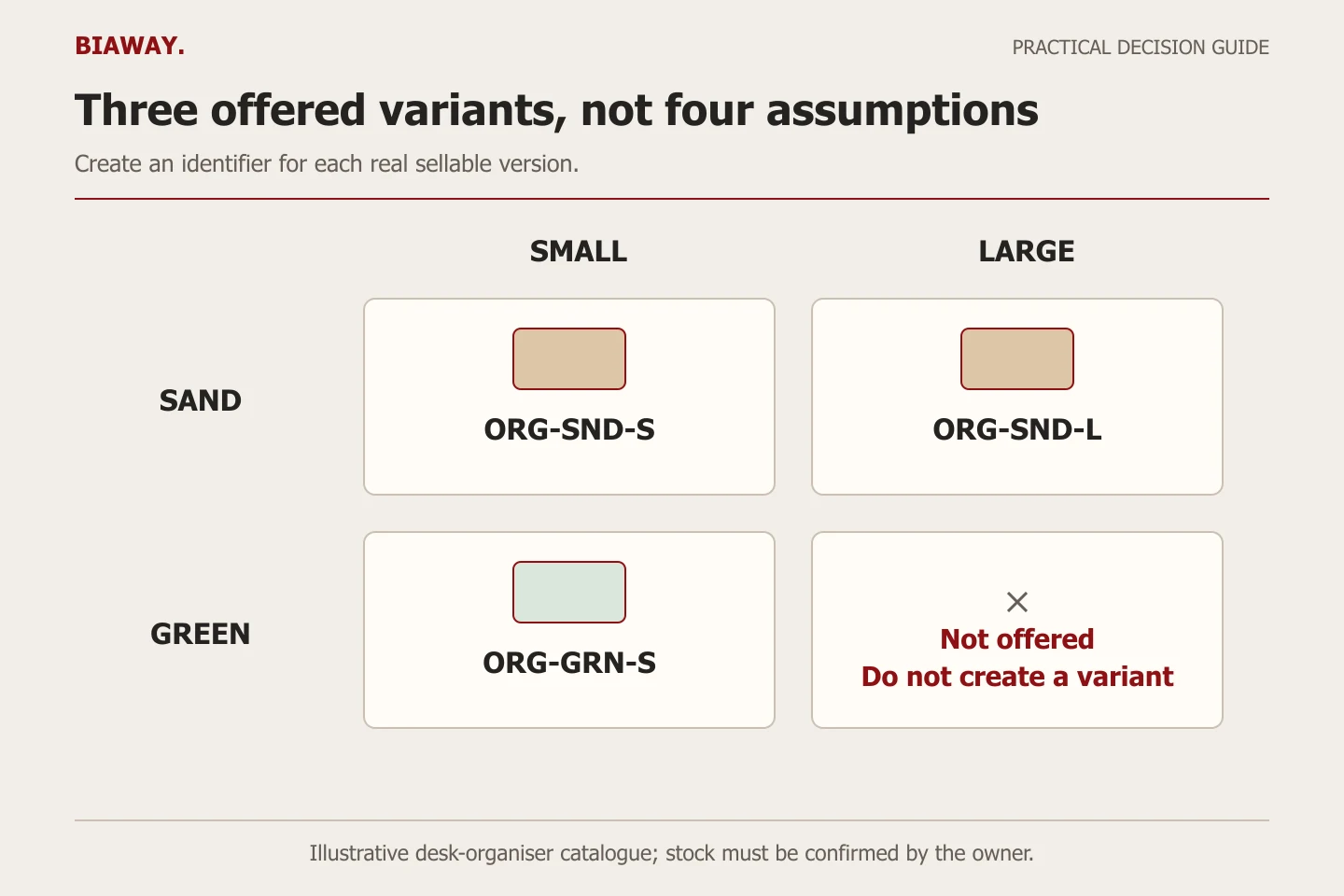
Imagine a hypothetical desk organiser offered in two colours and two sizes. Four combinations are possible, but perhaps the large green version is not sold. The catalogue should contain the three real variants, not generate a fourth simply because two option lists were supplied.
The codes below are illustrative internal SKUs, not real Biaway products or barcodes. Each row describes one distinct item. A shared parent reference lets the implementer group the variants under one product page while keeping their operational details separate.
Scroll the table sideways to read every column.
| Parent product | Colour / size | SKU | Sale status | Image reference |
|---|---|---|---|---|
| Desk organiser | Sand / small | ORG-SND-S | Offered; owner confirms stock | org-sand-small-main |
| Desk organiser | Sand / large | ORG-SND-L | Offered; owner confirms stock | org-sand-large-main |
| Desk organiser | Green / small | ORG-GRN-S | Offered; owner confirms stock | org-green-small-main |
| Desk organiser | Green / large | Not assigned | Not offered; do not create | Not applicable |
Separate public product data from operating fields
Give the designer the field names, units and approval status before populating hundreds of rows. A blank value should have a clear meaning: unknown, not applicable or awaiting confirmation. It should never silently become a zero price, free delivery, unlimited stock or a feature claim.
Use a compact handover with three linked sheets or equivalent structured records. The format is an editorial planning suggestion, not a requirement of every platform.
- Product record: stable parent reference, approved Arabic and English names, category, factual description and product-level documents.
- Variant record: parent reference, allowed option values, SKU, current price, stock treatment, weight and other necessary fulfilment data.
- Asset and approval record: exact image filenames, which variant they show, permission/source information, missing facts and the owner who approves publication.
Keep the identifier stable across languages and locations
Shopify's SKU guidance distinguishes internal SKUs from barcodes and recommends unique identifiers for effective inventory tracking. Choose a simple consistent scheme the team can use, or preserve an established scheme rather than renaming everything for the new website. Confirm how any existing inventory tool identifies products before changing codes.
Arabic and English descriptions should point to the same underlying sellable item when they are translations. Do not create a second stock pool merely because the title changes language. Likewise, stock held at separate real locations is an operational quantity question; it does not necessarily make the physical product a new variant.
Record what 'out of stock' should do: prevent ordering, allow an explicitly approved preorder, or trigger another supported behavior. Never infer the rule from an empty spreadsheet cell. Any preorder promise or replenishment date must be confirmed by the business.
References: Shopify: using SKUs to manage inventory
Trial a small import before loading the whole catalogue
An internal worksheet is not automatically a platform-ready import file. The implementer should map its fields into the current platform format, preserve a backup and test a small representative set. Shopify's CSV documentation shows that import columns and product grouping have specific meanings; use the current format rather than treating any spreadsheet as interchangeable.
Choose a simple item, an item with several options and one with a genuine exception. Check names, prices, images, option selection, stock behavior and order details. Open both languages on a phone and verify that choosing a variant shows the correct image and price. If a field is mapped incorrectly, fix the small test before repeating it across the catalogue.
- Approve a short sample containing the main catalogue patterns.
- Map the business fields to the chosen platform's import fields.
- Import into the agreed safe review environment and record warnings.
- Compare the rendered product and order details with the approved source rows.
- Resolve discrepancies, then approve the complete import and retain the source file.
References: Shopify: product CSV import and export
Use the same product identity across Saudi fulfilment cases
Consider a hypothetical Saudi Arabia retailer preparing stock for collection in Hofuf and Mubarraz within Al Ahsa, deliveries to Dammam and Khobar, and shipments to Riyadh and Jeddah. The same sand, small organiser should remain the same product identity wherever the customer is located. Destination-specific availability, shipping or collection rules should be documented separately from its Arabic and English names.
If one real collection location lacks a variant, do not imply that the entire catalogue is unavailable everywhere. Give the implementer the actual stock-location model and confirm what the selected platform can represent. This example is a planning exercise, not evidence of Biaway stockrooms, retail branches or nationwide merchant delivery. Biaway can prepare the website configuration online from approved business data.
Agree what the quoted product count means
Biaway's ecommerce catalogue reviewed on 16 October 2026 lists SAR 700 one-time setup and up to 25 products, including supplied SKUs and basic product options. It does not, by itself, define every possible relationship between products, variants and complex customisations. Send the real combination count and sample data before approving the quotation; obtain written confirmation of the included work.
Close the handover by asking staff to identify and fulfil several sample items using the delivered order information. If 'blue medium' could refer to three unrelated products, the record is not ready. Also name the person who will add future products, approve prices and correct data. A clean first import is only useful if the team can maintain the same discipline after launch.
References: Biaway: ecommerce product setup scope
How this guide was prepared
Prepared with AI assistance, with platform and accessibility claims checked against the primary sources below at publication. The planning frameworks are Biaway’s editorial recommendations. Examples labelled illustrative are not client stories or measured results. Platform features and requirements can change.
Your questions.
01Is an SKU the same as a barcode?
No. An SKU is an internal stock reference. A barcode is a different identifier or representation used for scanning and other systems. Keep each in the appropriate field and do not invent manufacturer identifiers.
02Should every colour have a separate product page?
Not automatically. If colours are versions of the same product, variants may fit. Distinct products or platform requirements can justify another structure; decide from the buyer's task and actual data.
03Should Arabic and English products use different SKUs?
Equivalent translations normally describe the same physical item and should not create duplicate stock identities. Confirm the exact multilingual model in the chosen platform.
04Does a 25-product package include unlimited variants?
Do not assume so. Provide the product and variant counts and ask the supplier to confirm the scope in writing before setup begins.