Are customers choosing one product—or buying a set?

Use variants when a customer chooses a version of one item, such as a size or colour. Use a bundle when the offer groups multiple items that are purchased together. The right setup depends on what the customer receives, how the components are stocked, and what the selected ecommerce platform actually supports. This guide keeps that decision separate from the internal SKU and catalogue-import questions covered in our product-data guide.
In this guide
Start with what the customer receives
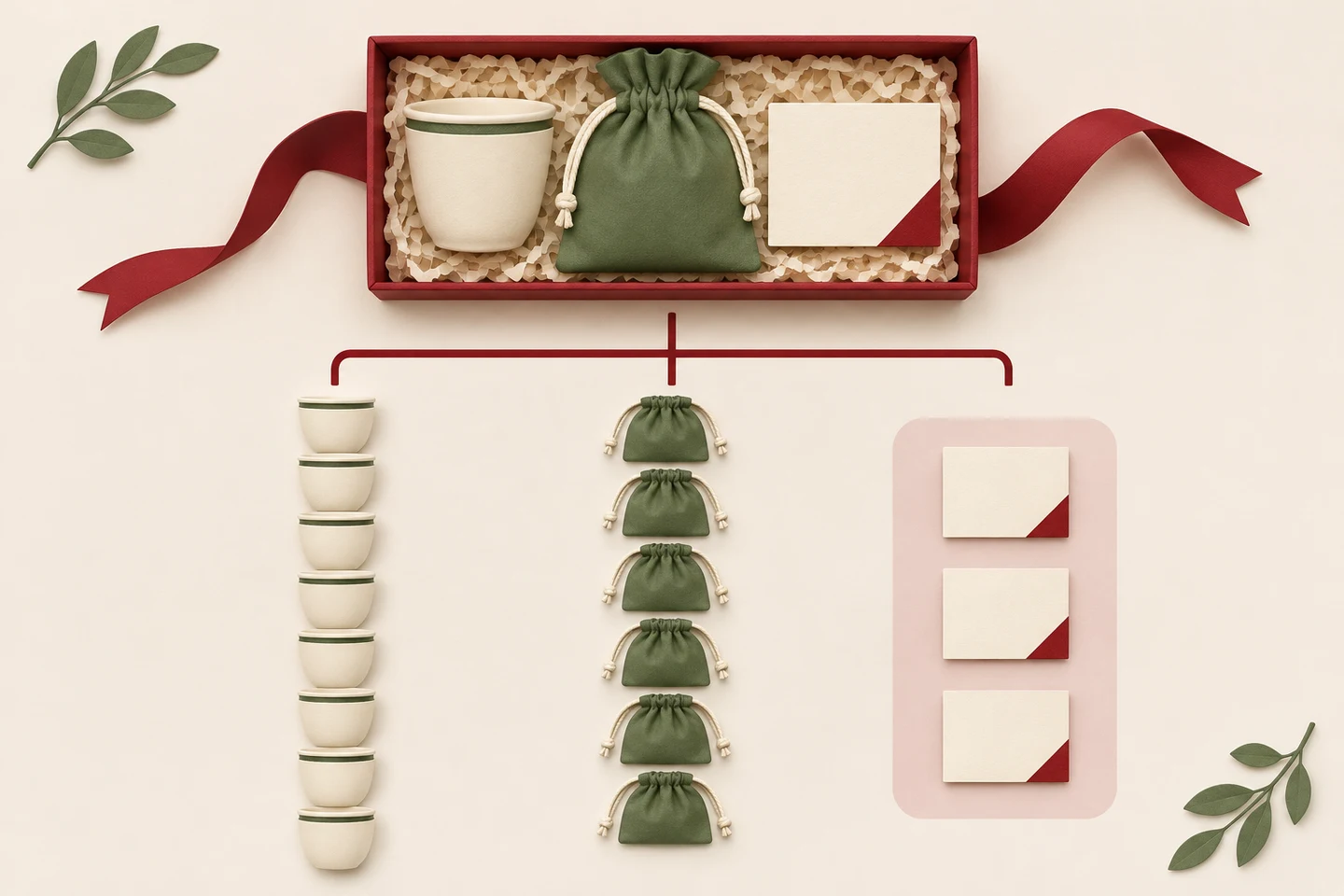
Ask one plain question: is the customer selecting a version of one item, or buying several items together as one offer? Colour, size, capacity or finish usually describe choices for the same base product. A gift set containing a cup, coffee pouch and card is a group of components sold together. That distinction guides the catalogue model; a platform may implement each model differently.
Do not decide from the product title or the number of rows in a spreadsheet. Draw the order the customer expects to receive, then list its sellable parts. Keep internal identifiers and import fields in the separate product and SKU handover guide.
References: Salla Help Center — Bundle product (multiple products) · Shopify Help Center — Shopify Bundles · Shopify Help Center — Adding variants
Compare variants and bundles without mixing them
For a variant, the shopper chooses one valid version of a product. Each offered combination needs accurate choices, image, price and availability. A bundle groups multiple products or quantities into one offer; the store must show what is included and determine what happens when a component changes or becomes unavailable.
Some platforms can represent a bundle while tracking availability through component items; others offer different structures or restrictions. Never assume that a feature, stock rule, discount behavior or product limit is universal. Check the current documentation for the platform, theme, apps, sales channels and inventory connection you will actually use.
Scroll the table sideways to read every column.
| Question | One product with variants | Bundle of products |
|---|---|---|
| What is purchased? | One item in a selected version | A defined group of items together |
| What changes before checkout? | Option choice, such as size or colour | Included components or quantities, if the offer allows them |
| What must be checked? | Valid combinations, price, image and version availability | Included-items display, component quantities, bundle price and availability behavior |
| Typical handover | Options and approved sellable combinations | Component list, quantities, bundle contents, rules and test cases |
References: Shopify Help Center — Shopify Bundles · Shopify Help Center — Adding variants
Use a hypothetical stock check before promising availability
Hypothetical example: a gift set contains one cup, one pouch and one card. The approved quantities are 8 cups, 3 pouches and 12 cards. If every set consumes one of each and the platform bases availability on all three components, at most 3 complete sets can be assembled from those quantities. This is a simple planning check, not a promise about how any specific platform calculates live stock.
Before launch, confirm whether the system reserves or reduces each component, whether the bundle can be sold when one part is unavailable, how returns and substitutions are recorded, and whether inventory differs by a real location. If the platform does not support the intended rule, change the offer or agree on a documented manual process; do not display an unverified stock promise.
Scroll the table sideways to read every column.
| Component | Available units | Units per set | Sets supported by this component |
|---|---|---|---|
| Cup | 8 | 1 | 8 |
| Pouch | 3 | 1 | 3 |
| Card | 12 | 1 | 12 |
| Whole set | — | one of each | 3, if the stated component rule applies |
References: Salla Help Center — Bundle product (multiple products) · Shopify Help Center — Shopify Bundles
Verify the selected platform’s actual behavior
Official platform documentation changes and features can differ by plan, app, theme, channel and inventory integration. For example, Shopify’s first-party bundle documentation describes particular bundle types and calls out specific inventory and price-update behavior. Treat those as Shopify-specific details, not a general ecommerce rule. Salla’s help material also explains its own bundle and component setup. Confirm the current behavior in your chosen account before scoping a build.
Ask the implementer to demonstrate the exact shopper path and a test order: choose the offer, inspect included products, change an allowed option, add it to cart, apply an eligible discount, and review order lines and stock after the test. For product variants, test the option-specific image and price. For a bundle, test the component effects and what the order record shows. Google documents ProductGroup and Product for describing genuine product variants; structured data should reflect the real catalogue and does not guarantee a search feature or ranking.
- Write the customer-facing offer in one sentence and list every included item and quantity.
- Choose variant or bundle based on what is purchased, not on a platform’s marketing label.
- Check current platform documentation and any theme, app, plan or inventory dependencies.
- Run one representative test order and verify the customer display, order record and stock outcome.
- Record edge cases: a missing component, a price change, a return, a substitution and stock by location.
References: Salla Help Center — Bundle product (multiple products) · Shopify Help Center — Shopify Bundles · Shopify Help Center — Adding variants · Google Search Central — Product variant structured data
Prepare a small, reviewable catalogue handover
Give the web team one example of each real pattern: a simple item, an item with options and the proposed set. Include approved names in Arabic and English, factual contents, quantity per offer, option values, current public prices, images, availability owner, and the rules that still need confirmation. Do not put confidential supplier costs in customer-facing product fields.
For how options and stock references should be handed over, see the existing product/SKU guide. For post-purchase delivery regions and charges, see the shipping-rules guide.
References: Biaway — Product and SKU handover for a Saudi store
Plan one catalogue for Saudi locations without overstating delivery
Imagine a Saudi shop that lets customers collect a gift set in Hofuf or Mubarraz, both within Al Ahsa, and dispatches it from stock locations serving Dammam and Khobar. The online catalogue still needs one clear description of the included components and a tested availability rule; place names alone do not define inventory behavior.
For buyers in Riyadh, Jeddah, and other parts of Saudi Arabia, the merchant should confirm carrier coverage and checkout promises separately. A bundle model does not prove that every destination can be served. Biaway works online and can scope a store build remotely; it has no implied local branch and does not operate the merchant’s stock.
Confirm scope before the full catalogue is entered
A representative test catches mismatches before they are multiplied across many listings. Agree how many base products, variants, bundle definitions and supplied images are included in the setup. Ask what happens when the merchant changes a bundle component later, and who updates the related price and stock rules. Get the confirmed deliverables in writing; do not infer that a quoted product count includes unlimited options or complex bundles.
Biaway’s online web-design team can review a small catalogue sample and help define the implementation brief. A sample with one variant product and one grouped offer is usually easier to assess than a spreadsheet with no explanation.
How this guide was prepared
Prepared with AI assistance, with platform and accessibility claims checked against the primary sources below at publication. The planning frameworks are Biaway’s editorial recommendations. Examples labelled illustrative are not client stories or measured results. Platform features and requirements can change.
Your questions.
01Is a bundle just another product variant?
No. A variant is an offered version of one product, such as a size or colour. A bundle groups multiple items or quantities into one offer. A platform can model these in different ways, so confirm its current behavior.
02Should I create a bundle when products are often bought together?
Only if the customer receives a clearly defined group as one offer and you can maintain its contents, price and stock behavior. If the shopper simply chooses one item and one option, variants may be clearer.
03What if one bundle component runs out?
Decide and test whether the bundle becomes unavailable, can be assembled with an approved substitute, or follows another supported rule. Do not promise live availability until the platform and inventory process are confirmed.
04Does one product page always mean one SKU?
No. Page structure, sellable variants, bundle components and internal stock identifiers are separate concepts. Use the existing product-data handover guide to plan identifiers and records.
05Do all Saudi store platforms handle bundle stock the same way?
No. Platform behavior can vary and change. Check the current official documentation and test the exact plan, theme, apps, sales channels and inventory integration used by the store.